
Migrating from Google Workspace (G Suite) to platforms such as Microsoft 365, Exchange Server, or IMAP-based systems is a critical task for modern organizations. As businesses scale, email environments grow more complex, making migration planning and execution increasingly challenging. Among the many steps involved, mailbox mapping stands out as one of the most important – and often time-consuming – components.
Automatic mailbox mapping in EdbMails addresses this challenge by simplifying the entire process. It eliminates manual effort, reduces errors, and enables organizations to perform large-scale migrations efficiently with zero downtime.
This article explains how automatic mailbox mapping works, why it matters, and how it significantly improves the overall Google Workspace migration experience.
Understanding Mailbox Mapping in G Suite Migration
Mailbox mapping is the process of linking each source mailbox in Google Workspace to its corresponding destination mailbox in the target environment. This ensures that emails, contacts, calendars, and other data are delivered to the correct user accounts during migration.
For example:
- user1@source.com → user1@target.com
- hr@source.com → hr@target.com
- support@source.com → support@target.com
In automated migration, mailbox mapping is performed based on user attributes such as first name, last name, and display name, rather than exact email address or domain matching. This makes the process more flexible and practical for large organizations.
For example, if the source mailbox is abc@source.com and the target mailbox is abcd@target.com, EdbMails can automatically map these mailboxes based on matching user attributes. This means the email addresses do not need to be exactly the same for successful mapping.
However, when done manually, mailbox mapping becomes time-consuming and prone to errors. Even small mismatches can lead to incorrect data delivery or missing items, which can impact the overall success of the migration.
That’s why using an accurate and automated mapping approach is essential for ensuring a smooth, reliable, and enterprise-ready migration process.
Why Mailbox Mapping is Critical in Migration Projects
Mailbox mapping is far more than a simple configuration step – it is a foundational element that directly determines the accuracy, reliability, and overall success of a migration project. Every mailbox in the source environment must be precisely aligned with its corresponding destination mailbox to ensure that data is transferred correctly and remains accessible to the intended user.
Even a minor mismatch in mapping can create serious complications. For example, if a mailbox is incorrectly mapped, emails, contacts, and calendar data may be delivered to the wrong user account, leading to confusion, data exposure risks, and potential compliance issues. In other cases, improper mapping can result in incomplete migrations, where certain items are skipped, misplaced, or not transferred at all.
Common risks associated with incorrect mailbox mapping include:
- Emails delivered to incorrect users
Misrouted data can disrupt communication workflows and create security concerns, especially in enterprise environments handling sensitive information. - Missing or misplaced data
Inaccurate mapping can cause certain folders, messages, or items to be left behind or incorrectly assigned, affecting data completeness. - Increased troubleshooting and rework
IT teams may need to spend additional time identifying mapping errors, re-running migrations, and correcting inconsistencies. - Delays in migration timelines
Errors in mapping can slow down the entire migration process, especially when dealing with large datasets and multiple migration batches.
In large organizations managing hundreds or thousands of mailboxes, the impact of even a small percentage of mapping errors can quickly scale into significant operational challenges. These issues can affect user productivity, delay project completion, and increase administrative workload.
Accurate mailbox mapping is therefore essential to maintain data integrity, ensure that every user receives the correct data, and support a seamless migration experience. When executed properly, it enables a structured and reliable transition, minimizes risks, and helps organizations complete their migration efficiently with zero downtime.
How Automatic Mailbox Mapping Works in EdbMails
EdbMails simplifies mailbox mapping by automating the entire process using intelligent algorithms and predefined logic. Instead of relying on time-consuming manual configuration, the software analyzes both the source and target environments to establish accurate mailbox relationships automatically. This significantly reduces complexity and ensures a faster, more reliable migration setup, especially for large organizations.
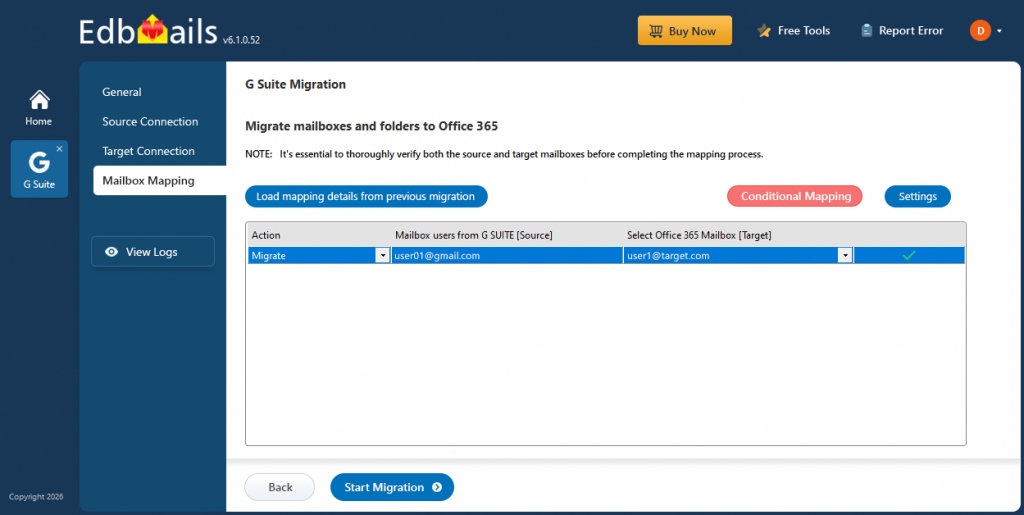
Key Functionalities of EdbMails Automatic Mailbox Mapping
Automatic Detection of Mailboxes
EdbMails scans both the source (Google Workspace) and the destination platform (such as Microsoft 365, Exchange, or IMAP) to identify available mailboxes. It retrieves mailbox details and attributes, enabling the system to prepare accurate mapping before the migration begins.
Intelligent Matching Logic
The software uses smart matching techniques to align source and target mailboxes based on user attributes such as:
- First name
- Last name
- Display name
This approach ensures accurate mapping even when email addresses are not exactly the same. It improves flexibility and makes the process more effective in real-world enterprise environments.
Bulk Mapping Capability
EdbMails supports mapping multiple mailboxes simultaneously, making it highly efficient for enterprise-scale migrations. Whether migrating dozens or thousands of mailboxes, the system processes them in bulk, significantly reducing setup time.
Minimal Manual Intervention
With automation handling most of the mapping process, administrators do not need to configure each mailbox individually. This reduces administrative workload, minimizes human errors, and allows IT teams to focus on monitoring and optimization.
Flexible Overrides for Complex Scenarios
In scenarios where adjustments are required – such as renamed users or unique mailbox structures – administrators can manually modify mappings. This ensures complete control and accuracy even in complex migration environments.
By combining intelligent automation with manual flexibility, EdbMails delivers a highly efficient and accurate mailbox mapping process. This not only speeds up migration setup but also ensures reliable data transfer, making it an essential feature for enterprise-grade Google Workspace migrations with zero downtime.
Key Benefits of Automatic Mailbox Mapping in Google Workspace Migration
Automatic mailbox mapping in EdbMails is a powerful capability that significantly improves the efficiency, accuracy, and scalability of Google Workspace migration projects. Designed as an enterprise-grade feature, it eliminates manual effort and enables organizations to handle complex migrations with confidence and zero downtime.
1. Significant Time Savings
With EdbMails, automatic mailbox mapping reduces configuration time from hours or even days to just minutes. This allows IT teams to quickly initiate migration projects and meet strict enterprise timelines without delays.
2. Improved Accuracy and Reliability
By leveraging intelligent automation, EdbMails eliminates the risks associated with manual mapping. This ensures precise mailbox alignment and reliable data transfer, even in large and complex environments.
3. Scalability for Enterprise Environments
Built for enterprise-grade performance, EdbMails can handle thousands of mailboxes across multiple domains without compromising speed or stability. This makes it ideal for large organizations requiring high-performance migration capabilities.
4. Reduced Administrative Burden
With EdbMails automating mailbox mapping, IT administrators no longer need to spend time on repetitive configuration tasks. This allows teams to focus on monitoring, validation, and the overall migration strategy.
5. Consistent and Accurate Data Delivery
EdbMails ensures that all emails, contacts, and calendar data are delivered to the correct destination mailboxes without inconsistencies, maintaining complete data integrity throughout the migration.
6. Faster Migration Completion
By accelerating the setup phase, EdbMails helps organizations complete migration projects faster while maintaining enterprise-level accuracy and performance.
Role in Large-Scale Enterprise Migrations
For large organizations, migrations are typically executed in multiple phases to reduce risk and maintain operational continuity. EdbMails plays a crucial role in simplifying these complex, large-scale migration projects.
With its automatic mailbox mapping capability, EdbMails enables bulk operations across departments, ensuring consistent mailbox alignment throughout all migration batches. This consistency is critical for maintaining accuracy when migrating thousands of users.
Additionally, EdbMails significantly reduces manual workload, allowing IT teams to efficiently manage enterprise-level migrations without being overwhelmed by configuration tasks. The automation also supports faster execution and better decision-making, helping organizations stay on schedule.
By combining scalability, automation, and reliability, EdbMails becomes an essential solution for enterprises managing complex migration environments with zero downtime.
Integration with Other EdbMails Features
Automatic mailbox mapping in EdbMails works seamlessly with a range of advanced features, delivering a complete and enterprise-grade migration solution.
Incremental Migration
EdbMails supports incremental migration, ensuring that only newly added or modified items are transferred in subsequent runs. This prevents duplicate data and keeps the migration process efficient and synchronized.
Secure API-Based Authentication
With secure API-based connectivity, OAuth 2.0 authentication, and domain-wide delegation, EdbMails enables secure access to mailboxes without requiring individual user credentials, ensuring compliance and data protection.
Automatic Mailbox Creation
EdbMails can automatically create mailboxes in the target environment, simplifying preparation and ensuring that all users are ready for migration without additional manual effort.
Advanced Filtering Options
With built-in filtering capabilities, EdbMails allows administrators to migrate only relevant data based on date, sender, or folder, optimizing performance and reducing unnecessary data transfer.
Detailed Migration Reports
EdbMails provides comprehensive migration reports that offer full visibility into mailbox mapping and migration progress. This helps administrators track status, validate results, and resolve issues quickly.
Zero Downtime Migration
One of the key advantages of EdbMails is its ability to perform migrations with zero downtime. Users can continue working without interruption while the migration runs in the background, ensuring complete business continuity.
By combining intelligent automation with enterprise-grade performance, EdbMails delivers a highly efficient, secure, and scalable migration experience. Automatic mailbox mapping is just one of the many features that make it a preferred choice for organizations handling complex Google Workspace migrations.
Best Practices for Using Automatic Mailbox Mapping in G Suite Migration
To fully leverage the capabilities of automatic mailbox mapping in EdbMails, organizations should follow a structured approach. These best practices help ensure maximum accuracy, reduce risks, and enable a smooth, enterprise-grade migration experience with zero downtime.
Verify Mappings Before Migration
Although EdbMails automates mailbox mapping with high accuracy, it is always recommended to review the mappings before initiating the migration. A quick validation step helps confirm that each source mailbox is correctly aligned with its destination, preventing potential data misplacement and ensuring complete reliability.
Conduct a Pilot Migration
Running a pilot migration with a small group of users allows organizations to test configurations, validate mapping accuracy, and assess performance. This step helps identify any potential issues early and ensures that the full-scale migration using EdbMails proceeds smoothly without unexpected disruptions.
Maintain Consistent Naming Conventions
Consistent email naming structures across source and target environments significantly improve the accuracy of automatic mailbox mapping. When naming conventions are aligned, EdbMails can match mailboxes more efficiently, reducing the need for manual adjustments and ensuring faster setup.
Monitor Logs and Reports
EdbMails provides detailed migration logs and reports that offer complete visibility into the mapping and migration process. Regularly monitoring these reports helps administrators track progress, detect anomalies, and resolve issues quickly, ensuring a controlled and successful migration.
Plan for Exceptions
In certain scenarios such as renamed users, domain changes, or complex mailbox structures automatic mapping may require manual adjustments. EdbMails allows flexible overrides, enabling administrators to handle such exceptions with precision while maintaining overall accuracy.
Conclusion
Automatic mailbox mapping is a critical feature that significantly transforms the way Google Workspace migrations are executed. By eliminating manual effort, reducing the risk of errors, and enabling seamless scalability, it simplifies one of the most complex aspects of the migration process.
With its intelligent automation, secure API-based architecture, and enterprise-grade performance, EdbMails empowers organizations to execute migrations efficiently, accurately, and with zero downtime. Its ability to integrate mailbox mapping with advanced features such as incremental migration, automated mailbox creation, and detailed reporting further enhances reliability and control.
For organizations planning a Google Workspace migration, leveraging automatic mailbox mapping in EdbMails is not just a benefit it is a strategic necessity. It ensures a smooth, secure, and high-performance transition while maintaining complete data integrity and business continuity.