For many IT teams, migration day is where planning turns into execution. Everything may appear fully prepared on paper, but once the Office 365 migration begins, unexpected issues such as mail flow disruptions, missing emails, or authentication failures can arise quickly, often within minutes of cutover. If not resolved promptly, these problems can directly affect business operations.
This is where a rollback plan becomes essential.
In Office 365 migration, a rollback refers to reverting mail flow, user access, and services back to the original environment when something goes wrong during or after the migration. It acts as a safety mechanism that supports zero downtime, ensuring users can continue working without interruption or prolonged service impact.
For example, if MX records are updated but mailboxes are not fully accessible in the target environment, users may suddenly stop receiving emails. In such cases, a rollback helps restore normal mail flow quickly and prevents extended disruption.
While having a rollback plan is important, using a reliable solution like EdbMails Office 365 Migration Tool helps reduce the likelihood of such scenarios. With better control over data transfer, incremental migration, and detailed reporting, it supports a more stable and predictable migration experience.
Why Do Office 365 Migrations Fail?
Office 365 migration is not just about moving emails. It also involves handling large volumes of data, managing permissions, configuring DNS, and maintaining uninterrupted access for users. Because of this complexity, even a minor issue can impact the entire migration process.
One of the most common challenges is throttling, where Office 365 limits API requests, slowing down or temporarily pausing migrations. DNS or MX record misconfigurations can disrupt mail flow immediately after cutover, leading to delays or undelivered emails. In addition, large mailboxes or archive data may not migrate completely in the first attempt, resulting in missing or inconsistent data.
Other factors such as incorrect mailbox mapping, authentication failures, or licensing issues can further complicate the process. In most cases, migration failures are not caused by a single issue, but by a combination of configuration gaps, system limitations, and timing-related factors.
Understanding these risks helps administrators quickly determine whether the issue can be resolved or if a rollback is required.
When Should You Perform a Rollback?
Not every issue during an Office 365 migration requires a full rollback. In many cases, problems can be resolved by correcting configurations or re-running the migration for specific mailboxes. However, there are situations where continuing the migration may create more complications than reverting.
A rollback becomes necessary when critical services are impacted, especially if users cannot access their mailboxes or if email delivery is disrupted across the organization. It is also the safer option when a significant amount of mailbox data is missing or inconsistent, allowing you to return to the source environment instead of continuing with an unstable setup.
In general, rollback should be considered when:
- Mail flow is completely disrupted
- Users are unable to access their mailboxes
- A large number of mailboxes are incomplete
- Critical data appears missing or corrupted
If the issue cannot be resolved within a reasonable timeframe and business operations are impacted, initiating a rollback is the safest approach. The longer a failed migration continues without rollback, the harder it becomes to recover cleanly due to partial data states and inconsistent mail flow.
How to Rollback an Office 365 Migration Safely
Executing a rollback requires a structured approach to avoid further complications and ensure a smooth recovery.
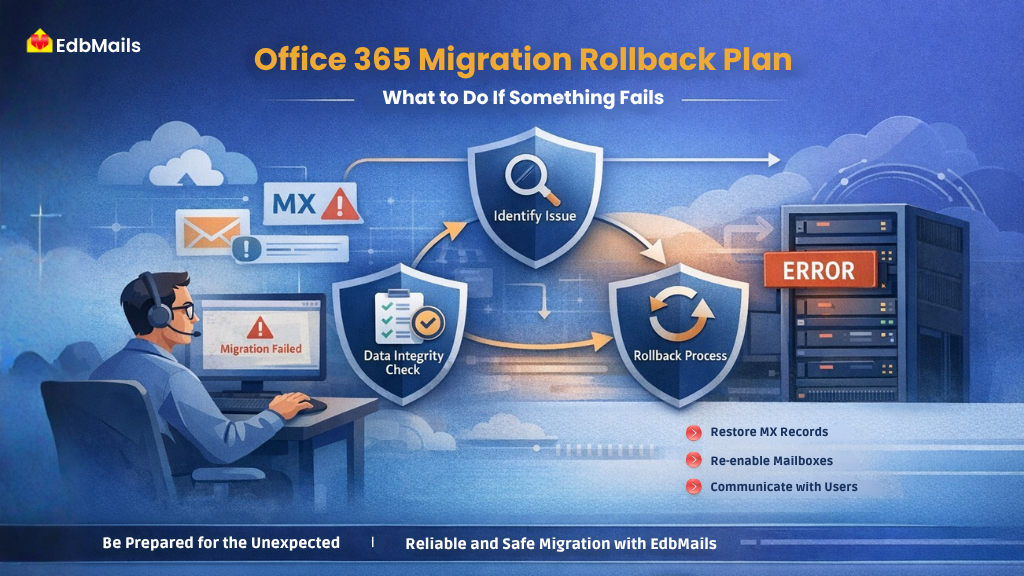
The first step is to clearly identify and confirm the issue. This involves reviewing migration logs, validating mailbox access, and testing email flow across affected users. If the problem is widespread and impacting business operations, proceeding with a rollback is justified.
The most critical step in the rollback process is reverting the MX records. Since MX records control how emails are routed, updating them back to the source environment restores incoming mail flow. It is important to verify DNS propagation after making these changes to ensure that emails are being delivered correctly without delays.
Once mail flow is restored, administrators should focus on restoring user access. This includes re-enabling access to source mailboxes and reversing any temporary configurations applied during migration. Users should be able to log in and continue their work without interruption.
After access is restored, validating data integrity becomes essential. Administrators should carefully check emails, attachments, folders, contacts, and calendars to ensure that no data has been lost or altered during the process. Performing validation across multiple users and departments helps confirm that the environment is stable.
Communication also plays a key role during rollback. Informing users about the situation, guiding them on how to access their mailboxes, and sharing next steps helps reduce confusion and maintain trust within the organization.
Post-Rollback: Preparing for a Successful Migration
A rollback should not be viewed as a failure, but rather as a controlled recovery step. Once the environment is stabilized, it is important to analyze what went wrong before attempting migration again.
This involves reviewing migration reports, identifying root causes such as throttling, configuration issues, or performance limitations, and making the necessary adjustments. Each issue identified during rollback provides valuable insight that can improve the next migration attempt.
Running a pilot migration with a small group of users is highly recommended before proceeding with a full-scale migration. This helps validate the updated configuration and ensures that the same issues do not repeat.
A well-planned retry significantly increases the chances of a successful migration.
How EdbMails Helps Reduce Rollback Risk
While having a rollback plan is essential, the ultimate goal is to avoid needing one. This largely depends on how well the migration process is managed.
EdbMails helps minimize rollback scenarios by providing better control, visibility, and consistency throughout the migration process. Its incremental migration capability ensures that only new or modified data is transferred in subsequent runs, preventing duplication and maintaining accuracy.
The tool also handles throttling automatically, allowing migrations to continue smoothly even under Office 365 limitations. Features such as pause and resume, automatic mailbox mapping, and detailed reporting enable administrators to monitor progress in real time and resolve issues early.
By simplifying complex migration tasks and improving reliability, EdbMails supports a more stable Office 365 migration experience.
Best Practices to Avoid Rollback
A successful migration starts with proper preparation. Organizations that invest time in planning and validation are far less likely to encounter critical issues.
Some key practices include:
- Running a pilot migration before full deployment
- Lowering DNS TTL values prior to cutover
- Verifying mailbox mapping and permissions
- Keeping the source environment unchanged until validation is complete
- Monitoring migration progress continuously
These steps help minimize risks, improve migration stability, and ensure a smoother transition.
Conclusion
An Office 365 migration rollback plan is a critical part of any migration strategy. It provides a safety net that allows organizations to quickly restore normal operations when unexpected issues occur.
By understanding when to initiate a rollback, following a structured recovery approach, and preparing the environment properly, businesses can minimize downtime and maintain continuity.
At the same time, choosing the right migration approach and tools makes a significant difference. With solutions like EdbMails Office 365 Migration, organizations gain better control, improved visibility, and a more reliable migration experience from start to finish.